7 Easy Steps: Make YouTube Shorts With AI Voiceovers
Table of Contents
Are you looking to scale your channel and create viral content? Learning how to make YouTube Shorts with AI is one of the most effective strategies for modern creators. Whether you are running a faceless channel, sharing historical facts, or creating motivational content, utilizing artificial intelligence can completely transform your production workflow. In this comprehensive guide, we will break down exactly how you can use free AI tools to generate high-quality voiceovers, edit your videos faster, and grow your audience without spending hours behind a microphone.
Why YouTube Shorts With AI Are Dominating
Short-form vertical video is currently the most heavily pushed content format across all major social media platforms. The algorithm favors creators who can upload consistently. But maintaining a daily upload schedule is incredibly difficult if you have to manually write scripts, set up lighting, record audio, edit out mistakes, and master the final mix.
By learning how to create YouTube Shorts with AI, you can bypass the most time-consuming parts of the production process. Instead of spending three hours on a single 60-second video, you can produce three to five high-quality Shorts in the exact same amount of time.
The secret to this speed is leveraging advanced text-to-speech models that sound entirely human. Gone are the days of robotic, monotone computer voices. Today’s AI can replicate emotional intonation, natural pauses, and human breathing patterns so perfectly that most viewers cannot even tell the difference.
The Perfect Workflow for Creators
To successfully run a channel using automated tools, you need a streamlined workflow. Here is the step-by-step process that top creators use to produce YouTube Shorts with AI efficiently:
- Script Generation: Start by writing a compelling script. You can use tools like ChatGPT or Claude to help brainstorm ideas, but always edit the script to ensure it sounds natural when spoken out loud. Keep sentences short and punchy.
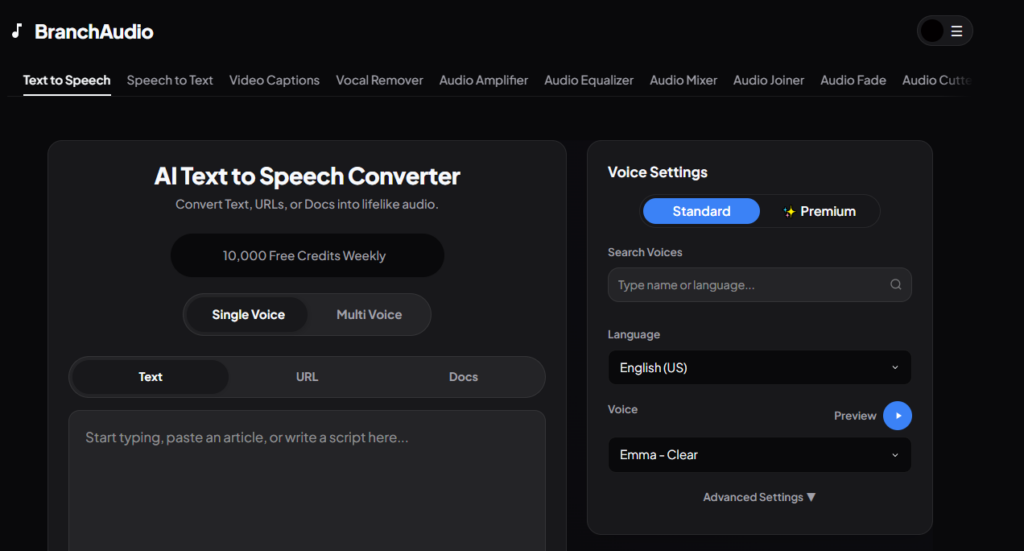
- Voice Generation: Paste your script into a high-quality audio generator. Our text to speech tool is explicitly designed for creators, offering studio-grade voices in multiple languages.
- Visual Assembly: While the audio is generating, gather your visuals. You can use stock footage, AI-generated images, or gameplay clips. The key is to keep the visuals changing every 2-3 seconds to maintain viewer attention.
- Editing and Subtitles: Bring your AI audio and visuals into your editing software. Add dynamic, animated subtitles in the center of the screen. Since most mobile users watch videos on mute initially, large subtitles are crucial for catching their attention.
- Audio Mixing: Add a trending background track and subtle sound effects. Make sure the music does not overpower your voiceover.
Creating Voiceovers for Free
One of the biggest hurdles for new creators is budget. Hiring professional voice actors on freelance marketplaces can cost hundreds of dollars per video. If you are uploading daily, that quickly becomes unsustainable.
Fortunately, you don’t need a massive budget to get started. You can generate professional-grade voiceovers without spending a dime. We offer a generous free tier that gives you 10,000 free credits every single week. If you need more capacity as your channel grows, you can easily upgrade by checking out our transparent pricing page.
Best Niches for AI Shorts
If you are wondering what kind of content works best when making YouTube Shorts with AI, the answer is almost anything that relies on storytelling or facts. However, some niches perform exceptionally well:
- True Crime and Mysteries: Use a deep, suspenseful AI voice to narrate unsolved mysteries over eerie background footage.
- Historical Facts: Quick, 60-second history lessons are incredibly popular. An authoritative voice works perfectly here.
- Motivational Quotes: Pair cinematic, inspiring music with a powerful AI voice reading quotes from stoic philosophers or successful entrepreneurs.
- Trivia and Quizzes: Create interactive Shorts where the AI asks a question, counts down from 3, and reveals the answer.
- Tech and Finance News: Summarize the day’s top headlines using a professional, news-anchor style voice.
Optimizing Your Audio Quality
Even the best AI voice needs proper mixing to sound truly professional on mobile devices. When you make YouTube Shorts with AI, always remember that your viewers are listening through tiny smartphone speakers.
To optimize your audio, you should apply light compression and equalization (EQ). Compression reduces the dynamic range, making the quiet parts louder and the loud parts quieter, ensuring a consistent volume level. EQ allows you to boost the high frequencies (adding crispness) and slightly reduce muddy low frequencies. If you don’t know how to do this manually, look for tools that offer built-in audio enhancement or “amplifier” features that master the track for you.
Scaling Multiple Channels Simultaneously
Once you master the workflow for one channel, the true power of artificial intelligence reveals itself: scalability. Traditional creators are bound by their physical limitations. They can only record so many videos before losing their voice or burning out.
With AI, you can run multiple channels in completely different niches simultaneously. You can have a history channel using a British accent, a tech channel using an energetic American voice, and a storytelling channel using a Hindi AI voice—all managed by one person from a single laptop.
This is how modern digital media companies are built. By removing the bottleneck of human recording, you transform your YouTube channel from a hobby into an automated content factory.
Common Mistakes to Avoid
While the technology is incredibly powerful, there are a few common pitfalls that new creators fall into when generating YouTube Shorts with AI:
- Ignoring Punctuation: AI models use commas, periods, and question marks to determine where to breathe and how to inflect. A script with no punctuation will sound rushed and robotic. Always format your script properly before generating the audio.
- Using the Wrong Tone: Match the voice to the content. A hyper-energetic voice reading a sad historical story creates a jarring disconnect for the viewer. Take the time to audition different voices before settling on the final one.
- Forgetting Sound Design: A voiceover alone is rarely enough. The best Shorts utilize background music and sound effects (swooshes, pops, risers) to maintain high retention rates.
Looking for a deeper dive? Check out our Ultimate Guide to AI Voice Generation for YouTube Shorts for a complete masterclass on building an automated channel.
\n
Conclusion
The creator economy is evolving faster than ever. Those who adapt to new technologies will thrive, while those who refuse to change will struggle to keep up with the increasing demand for high-quality, daily content.
By embracing these tools and learning how to make YouTube Shorts with AI, you are positioning yourself at the forefront of this digital revolution. You can produce better content, reach wider audiences, and grow your channels faster than you ever thought possible. All it takes is a solid script, a great AI voice generator, and a bit of creativity.
So what are you waiting for? Start writing your next script, generate a highly engaging voiceover, and upload your next viral Short today!